
How to Optimise a SaaS Demo Page for Conversion

How to review a sales-led demo page in the order the buyer meets it, from the promise that brought them there to what sales does next.

Anita V. · Co-Founder of GrowthLens

LinkedIn8 min read

In short

To optimise a SaaS demo page, start with what the visitor was promised before they arrived. Then check that the page answers their main question, shows the product solving their problem, carries proof they trust, qualifies without interrogating and explains what happens next. Judge it by accepted opportunities, not form fills.

A request to fix a demo page usually arrives with a diagnosis attached. The form is too long, the headline is weak, the button should say something else. Sometimes one of those is true. It is also worth checking two other things. The page may be asked to convert people it was never written for. Or it may be making an ask the visitor is not ready for.

A demo page comes after the promise that brought the visitor there and before the sales conversation that follows. Optimising it means checking seven things in the order the buyer meets them.

What a demo page is for

A demo page has one job. It should help a qualified buyer decide that a conversation with your team is worth their time, and make that request easy. It is not a homepage, and it should not try to explain the whole product.

That also sets how to judge it. A page that doubles its form fills and halves the share of requests sales accepts has not improved. The measure I use is accepted opportunities from the page, by source.
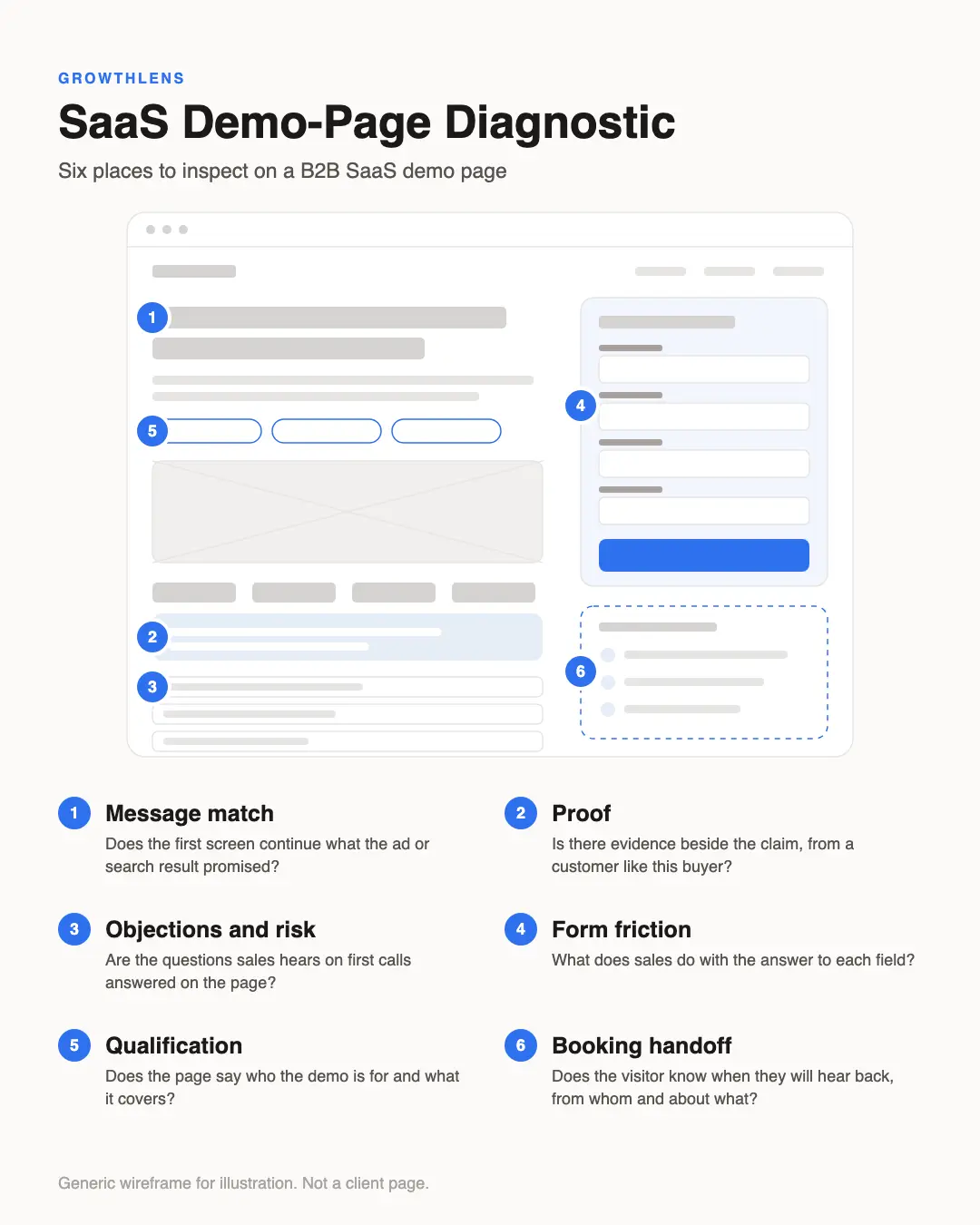
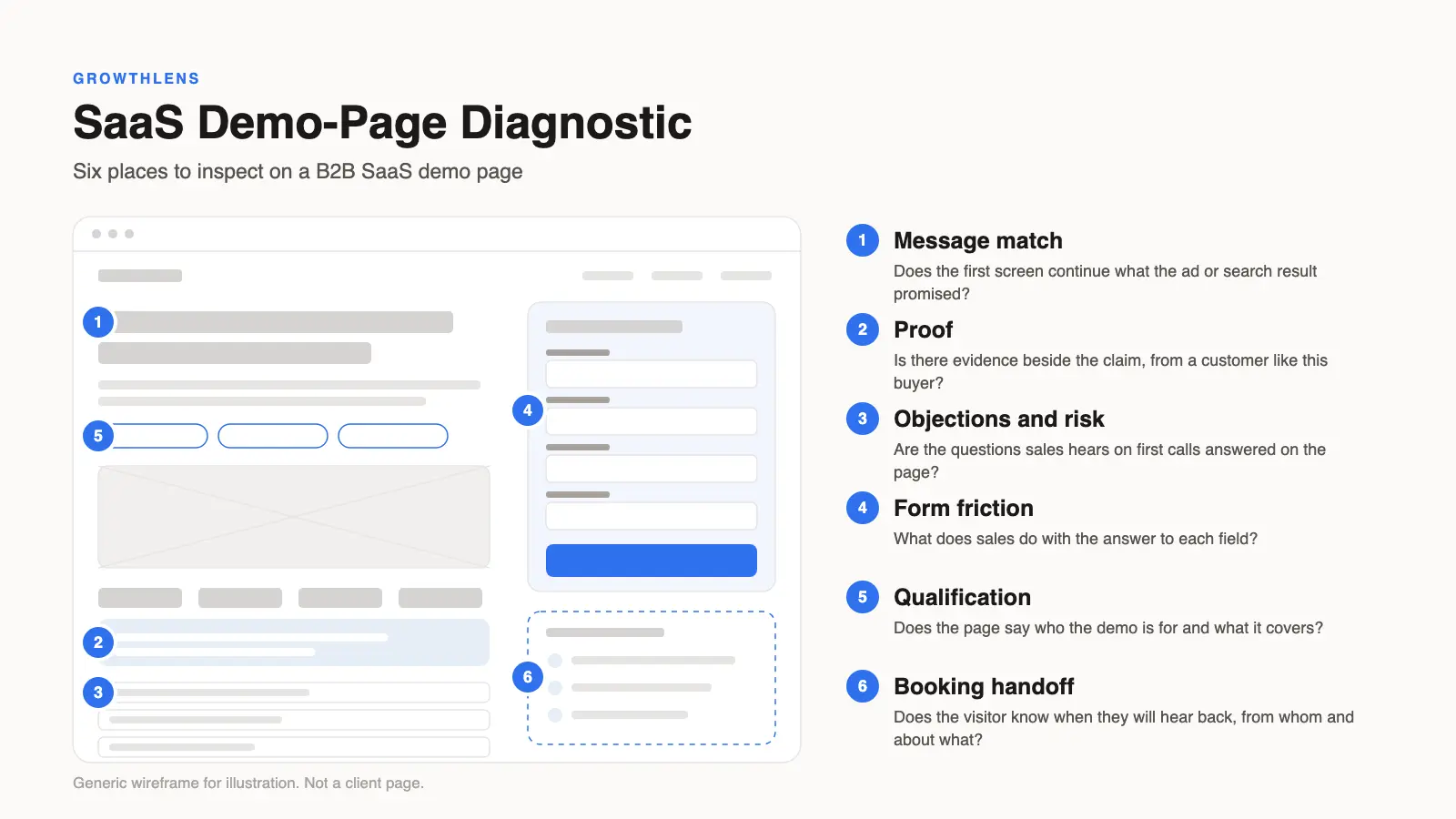
Annotated wireframe of a generic B2B SaaS demo page with six numbered inspection points: message match, proof, objections and risk, form friction, qualification and booking handoff.
Use this review in the order a buyer meets the page: promise, question, product, proof, qualification, form and handoff.

Acquisition promise

What to ask
What did the ad or search result promise, and does the first screen continue it?

Buyer question

What to ask
What is the main question this visitor arrived with, and where does the page answer it?

Product narrative

What to ask
Can the visitor see the product doing one real job from start to finish?

Proof

What to ask
Which claim has no evidence beside it, and what proof would this buyer need?

Qualification

What to ask
Does the page say who the demo is for and what it covers?

Form friction

What to ask
What does sales do with the answer to each field?

Sales handoff

What to ask
Does the page say when they will hear back, from whom and what the call will cover?
The seven checks, in the order the buyer meets them. Each is covered below.

The acquisition promise: what the visitor was told

Start before the page. Look at the ads, the search queries and the internal links that send people to it, and write down what each one promised.

Take someone who searched for construction management software for subcontractor coordination and clicked an ad that used those words. If the demo page opens with a general line about project visibility, the specific promise has gone. The visitor has to work out alone whether this is still the product they were looking for.

When one demo page serves several campaigns with different promises, check each promise against the first screen. A small number of versions, each continuing one promise, may work better than a single page for everyone. That needs validating on your own traffic.

The buyer question: the one thing they need answered

Every visitor to a demo page is carrying a question. It depends on where they are in the purchase. Someone early wants to know whether the product handles their situation at all. Someone comparing vendors wants to know how you differ from the one they saw yesterday. A technical evaluator wants to know whether it works with their stack and meets their security requirements.

Sales already hears these questions on first calls. Ask for the ones that come up most often, and check whether the page answers any of them above the form.

Product narrative: show the job being done

Buyers request a demo when they can picture the product solving their problem. Feature lists rarely do that. A short narrative does: the situation the buyer is in, what the product does about it, and what is different afterwards.

On a demo page this can be a few screenshots with one line each, or a short recording, following one real job from start to finish. Imagine the construction example again. Site report submitted from a phone, issue flagged to the subcontractor, project manager sees the delay risk the same day. That tells a project director more than "real-time collaboration".

Keep it to one job per page. If the product serves several distinct jobs, that is another reason for more than one version.

Proof: evidence for the people who have to be convinced

Proof on a demo page has to work for more than the person filling in the form. In B2B the visitor often has to justify the meeting to a manager, or will forward the page to a colleague.

Useful proof is specific and matched. A logo row shows that the product has customers. A customer who looks like the visitor, with a named role and an outcome they are allowed to state, shows that it works in their situation. Security and compliance evidence belongs here too when technical evaluators are part of the buying group.

If you do not have proof for a segment, be careful about building a demo page for that segment. The page will attract people sales then struggles to convince.

Qualification: say who the page is for

Qualification is often left to form fields. The page itself can do much of that work earlier.

State who the product is for: the company size, the team, the situation. State what the demo covers and how long it takes. If there is a minimum contract size or a plan that suits smaller teams better, say so and point those visitors to the right place. A visitor who recognises they are not a fit and leaves has saved your sales team a call. A visitor who recognises themselves is more likely to complete the form.

Where the product also has a trial or a self-serve plan, the demo page should say which route suits whom. Sending everyone to a call loses the people who wanted to try the product first.

Form friction: what each field costs and buys

There is no correct number of fields. Each field has a cost and a benefit. The cost is the visitors who abandon because of it. The benefit is what sales or routing does with the answer.

Go through the form with sales and ask of every field what happens to the answer. If a field changes who takes the call or how they prepare, it may be worth its cost. If nobody reads it, remove it. Questions about budget and timeline are the ones I would examine most closely, because they ask for trust before the page has earned it.

Check the mechanics as well. Try the form on a phone and read the error messages. See whether a business email rule rejects legitimate buyers, and whether the calendar or the form loads quickly on a slow connection. These are small checks, and each one can lose requests.

Sales handoff: what happens after the request

The moment after the form is submitted is part of the page. The visitor wants to know three things: when they will hear back, from whom and what the call will cover.

Say it on the page and again on the confirmation screen. If you can offer a calendar directly, it is worth trying, because the visitor leaves with a time in place of a promise of contact. Then look at what actually happens. A request can wait days for a reply, or receive a generic qualifying email in place of a meeting. Either way it can be lost after the page did its job.

How to measure a demo page

Record four numbers by source: visits to the page, form starts, completed requests and requests accepted by sales. The gaps between them tell you where to look. Many visits and few starts suggest the promise, the question or the proof. Many starts and few completions suggest the form. Many completions and few accepted suggest acquisition or qualification.

Visits to the demo page

Gap to the next
Visits to form starts
If the gap is large, look at
Promise, buyer question, proof

Form starts

Gap to the next
Starts to completed requests
If the gap is large, look at
Form fields, errors, mobile

Completed requests

Gap to the next
Requests to sales-accepted
If the gap is large, look at
Acquisition quality, qualification

Requests accepted by sales

Four numbers, three gaps. Record them by source.

Whether to test a change or validate it another way depends on the volume the page has. That is the subject of what to do before A/B testing in B2B SaaS.

What a demo page cannot fix

A demo page cannot repair the wrong audience, an offer the market does not want or a slow sales response. If the review shows that the right people are not reaching the page at all, the work belongs earlier, in the campaigns or the search strategy. When the wider pattern is traffic that does not become demos, start with the diagnosis of the whole path before rebuilding this one step.

Frequently asked questions

What should a SaaS demo page include?

It should continue the promise from the ad or search result and answer the buyer's main question. It should show the product doing one real job and carry proof matched to that buyer. It should also state who the demo is for, use a form whose fields sales actually needs and explain what happens after the request.

How many form fields should a demo request form have?

There is no fixed number. Keep each field that changes how sales routes or prepares for the call, and remove the ones nobody uses. Review budget and timeline questions most carefully, since they ask for trust early. Then check completion rate and sales acceptance together after any change.

Should a demo page have navigation?

It depends on the traffic. A dedicated page for a paid campaign can work with few exits, because the visitor came for one thing. A demo page reached from your own site by buyers still researching may need routes to pricing, security or a trial. Decide for each source.

What is a good conversion rate for a SaaS demo page?

A benchmark from another company tells you little, because the rate depends on traffic source, intent and how strict the qualification is. Compare your own page against itself by source over time, and read the share of requests sales accepts alongside the completion rate.

Demo or free trial: which should the page offer?

Offer the step that matches how the product is bought and how complex it is to reach value alone. Complex, multi-user products often need a guided conversation. Simple products with quick time to value suit a trial. Hybrid products can offer both and say clearly which suits which visitor.

How do I know whether the demo page or the traffic is the problem?

Split the numbers by source. If one source converts and is accepted by sales while another does not, the page is probably fine for the first audience and wrong for the second. If every source shows visits without form starts, examine the page itself more closely.

Where to begin on your own page

Open the ads and search queries that send people to your demo page, then read the page from the top as that visitor. Note the first place the promise is dropped or a question goes unanswered. That is usually a better starting point than the form.

If you need to decide whether the issue is the page, the traffic or the handoff after it, see how a SaaS conversion diagnostic works.

Further reading

Request an Opportunity Review

A free 20-minute call for B2B SaaS and technology and high-consideration businesses with existing traffic, paid demand or product traction.

Bring the pipeline number that is behind: qualified traffic, demos, trials, enquiries or paid conversion. I’ll assess the context and identify whether there is a meaningful opportunity.

I’ll use the call to decide whether a paid Diagnostic is the right next step.